KINDRED | A CASE STUDY IN TWO THREADS: AI AS THE PRODUCT, AND AI AS MY DESIGN PARTNER
An AI Scribe for Pediatric Care
Reducing documentation burden for pediatricians while preserving the human moments in care
ROLE
Product Designer
TOOLS
Claude Code, Figma
TIMELINE
4 Months
This project ran on two parallel tracks. The first: designing Kindred, an AI scribe for pediatric clinicians. The second: using AI, specifically Claude Code — as an active design partner throughout. I used it to generate structure, draft flows, and produce options fast. Then I tested those outputs against real clinical behavior and overrode them where they fell short. What follows documents both tracks.
OVERVIEW
I thought the problem was documentation. The real problem was trust.
Kindred is an AI-powered documentation assistant for pediatric clinicians, built to reduce documentation burden while preserving the relationship between clinician, child, and caregiver. What seemed like a clear automation opportunity quickly shifted. Research revealed that clinicians weren’t just concerned with speed—they needed control, clarity, and confidence in every note.
THE PROBLEM
Increasing cost of documentation in modern-day healthcare
Clinical documentation outside of patient visits is a serious burden for doctors, contributing to burnout and less face-to-face time with patients. Within short but complex visits, pediatricians must balance diagnosis, parent concerns, and documentation requirements simultaneously. A national mixed-methods study of 1,469 U.S. pediatricians revealed the scale of the problem:
73.6 %
Reported documentation as a moderate or major burden.
1-3 hours
Spent on charting outside patient visits every single day
Why pediatrics specifically?
Pediatric care is uniquely context-heavy. Visits often involve multiple speakers (caregiver, child, clinician), each offering partial and sometimes conflicting information. Clinicians must interpret not just what is said, but what is observed. Care is also shaped by developmental stages and milestone-based assessments, adding nuance that most systems are not designed to handle. As a result, documentation becomes a cognitive burden that competes with presence in the room.
AI scribes are emerging, but none designed for pediatrics

Competitive analysis highlighted a white-space opportunity for an AI scribe designed specifically for pediatric workflows.
Enterprise AI scribe solutions like Nuance DAX, Scribeberry, and Sully.ai are beginning to address this, but they're expensive, EHR-dependent, and built for general clinical workflows. They optimize for adult medicine workflows, leaving a gap for pediatric-specific documentation needs.
AI AS DESIGN PARTNER
AI provided data, but understanding required human research
I used ChatGPT and Gemini to gather national data and pressure-test the scope of the problem. What they couldn't tell me was how and whether this burden looked or felt different inside a pediatric exam room. And that question required a different kind of research entirely.
INTERVIEWS
Relationship-building plays an especially critical role in pediatric care
I interviewed pediatricians working in high-volume outpatient settings. Documentation wasn’t just a time burden, but an attention tradeoff. They were constantly choosing between being fully present with patients and keeping up with notes.
“It’s harder to write during a pediatric visit. You have to establish a relationship with the child quickly. A lot of times I’m playing with the kid while also getting the history from the parents.”
Dr. Tess Curran, Pediatrician
INTERVIEWS
AI AS DESIGN PARTNER
What real conversations with doctors revealed (that AI couldn’t see)
Speaking directly with pediatricians helped me fathom what it feels like. It visualized the exam room: the split attention between child and caregiver, the time pressure, the emotional regulation. These nuances don’t surface in AI summaries.
Three realities of pediatric documentation
Talking to pediatricians surfaced three tensions that shaped the designs that followed.
01 PRESENCE
Documentation competes with presence
“Parents notice when you are looking at the screen. Kids definitely notice.” - Outpatient pediatrician, 10+ years experience
Doctors aren't just losing hours, but the eye contact, rapport, and the ability to read the room.
Presence first, documentation second
Kindred handles documentation in the background so the clinician never has to divide their attention.
02 CONTEXT
The dual channel communication
"We typically rely on two historians, patient and parent.” - Pediatric ICU physician
Every pediatric visit has two patients: the child and the caregiver.
Understand the room, not just the words
Pediatric visits are interpretive. Kindred handles multiple speakers, developmental stage, caregiver anxiety, and history across visits.
03 TRUST
Automation without transparency breeds distrust
"Errors don’t stop at the note. They carry into orders, billing, and future care.” - Pediatrician
AI Error Elsewhere
AI Error in Pediatrics
Wrong meeting summary
Wrong dosage in the record
Misattributed email
Missed developmental cue
Incorrect calendar event
Caregiver concern goes undocumented
Keep the clinician in control
Every output must be reviewable, editable, and clearly attributed. The clinician is always the final authority.
EXPLORE
Before the right answer, several wrong ones
AI enabled rapid generation of structured, low-fidelity wireframes, allowing to explore and test ideas quickly with clinicians. Mapping flows early helped surface gaps and anticipate friction before moving into higher fidelity.
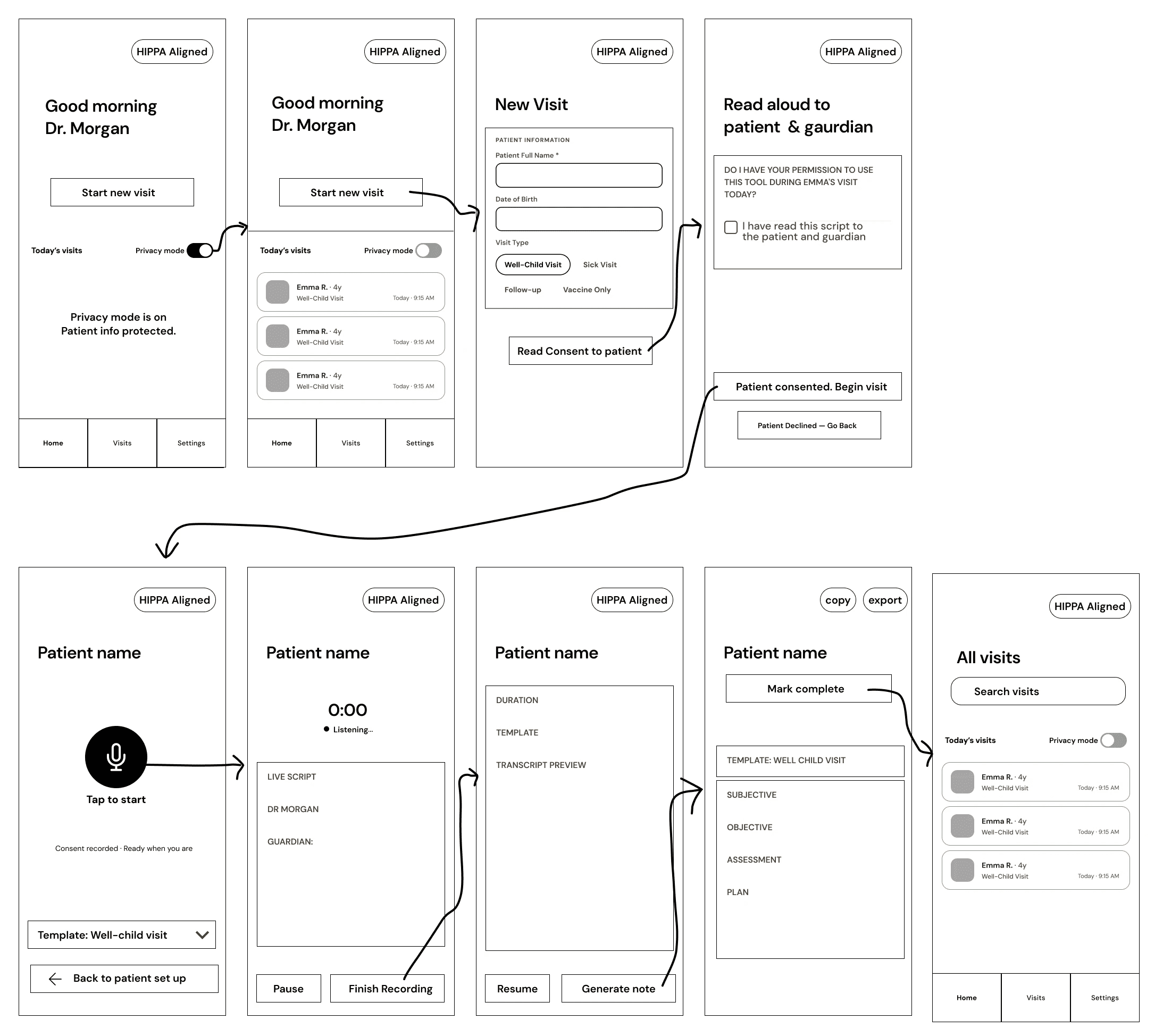
Early wireframes exploring initial user flows and structure
AI AS DESIGN PARTNER
High fidelity can create a false sense of completion
AI can produce high-fidelity prototypes quickly, which creates a false sense of completion. I went back to wireframing even after high-fidelity existed. Speed doesn't make throwaway work wasteful, but high fidelity creates a false impression of "done." Staying critical of the flow from zero is still the designer's job.
USABILITY TESTING
What testing with real pediatricians revealed
I tested the prototype with real pediatricians to uncover where it aligns with real workflows and where it doesn’t.
USABILITY TESTING
3
4
2
45 min
Start a visit
FINDING
“Not sure what kind of visit this is yet. I figure it out as I go."
DESIGN CHANGES
ITERATIONS
Designing With AI: What Worked and What Needed Human Judgment
AI AS DESIGN PARTNER
AI accelerated nearly every part of this process. But speed also made the gaps more visible. Below are two moments where AI output required deeper design judgment and what I did about it after testing with real people (pediatricians).
Designing for Clinical Reality
AI required template selection before recording began, forcing structural decisions before the conversation started. Usability testing proved otherwise: in real practice, pediatricians think in the opposite order.
AI AS DESIGN PARTNER
Template*
Consent
Record
Notes
Template selection before recording
A DESIGNER'S ROLE
Consent
Record
Notes + Template*
Clinical-reality-driven flow
DECISION
Workflow order is a mental model problem. Match how clinicians think, not how data is stored.
When a checkbox isn't enough
AI treated consent as a simple on/off setting. Elevated to a patient-facing handoff screen that pauses the workflow and requires explicit acknowledgement.
AI AS DESIGN PARTNER
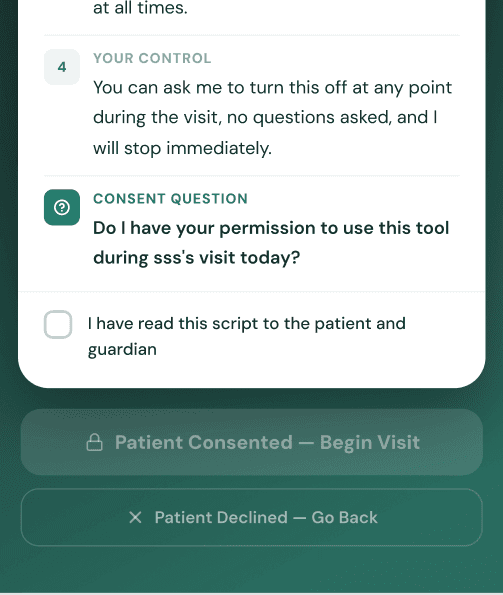

Consent as a passive checkbox
A DESIGNER'S ROLE
Consent as a handoff screen
DECISION
A checkbox signals preference. A modal signals obligation. When a moment carries legal weight, the interface must reflect that weight.
FINAL OUTPUT
Here's What All the Iteration Produced
FEATURES
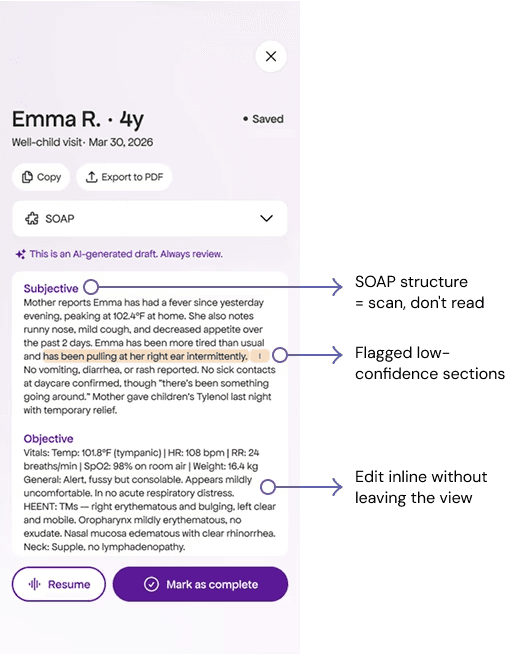
FEATURE 1: AI-GENERATED NOTE REVIEW
Challenge:
After a 20-minute visit, a clinician has 2-3 minutes between patients. How do you verify a full AI-generated note in that window without just rubber-stamping it?
KEY FEATURES
UX Decision:
After a 20-minute visit, a physician has minutes before the next patient. The note arrives pre-structured and flagged so the physician verifies, not transcribes, and nothing enters the record without their sign-off.
KEY FEATURES
FEATURE 2: RECORDING WITH SPEAKER LABELS
Two patients, one clinician. Kindred labels caregiver, child, and clinician separately so the note reflects the full room, not just what was said, but who said it.
FEATURES
FEATURE 3: FAMILY CONSENT HANDOFF
Control stays with the clinician, but transparency extends to the family. Caregivers can review, ask questions, and actively agree before anything is captured.
FEATURES
FEATURE 4: PEDIATRIC VISIT TEMPLATES
Structured around developmental stages, caregiver input, and safety-critical documentation unique to pediatric visits.
FEATURES
FEATURE 5: HIPAA-ALIGNED PRIVACY CONTROLS
Privacy that adapts to real clinical moments.
REFLECTION
Exercising judgment in an AI-accelerated workflow
The hardest part of working with AI wasn't getting it to produce something. It was knowing what to keep. Claude Code generated structure quickly, but accessibility failures, incoherent layer naming, and design decisions that didn't account for clinical context all required human intervention. That discernment of knowing what's right, not just what runs, is still the designer's job. Throughout the process, I found my role shifting from creator to editor, critic, and system thinker, ensuring the product reflected real clinical workflows and human moments.